Store screenshots for app developers
Upload the screenshots you already have, try a few looks on your own first page, and say yes to each page. Then take back a finished listing: iPhone, iPad and Android, at the exact sizes the stores ask for, in six languages. No design file. No canvas tool. No afternoon gone.
One app, six of the 33 looks New looks coming all the time
See all 33 looks → Safe Snacker · Photo-led
 Safe Snacker · Sky pop
 Safe Snacker · Dark premium
 Safe Snacker · Warm illustrated
 Safe Snacker · Electric ribbon
 Safe Snacker · Human touch
A recipe app, so these are full of food. Every app gets a look and feel of its own, drawn from what it does: see the same looks on a goal tracker.
40s
typical time to make one image
4
device sizes: iPhone, iPad, Android phone and tablet
6
languages, captions translated to fit
0
design files required
You already did the hard part. This is the ten minutes between finishing it and shipping it.
01 / YOUR APP
Two or three sentences, the way you would tell a friend. Every headline is written from it, and nothing it does not do is claimed.
Safe Snacker changes any recipe so you can eat it with your food allergies. Tell it what you avoid once, and it swaps the ingredients for you.
02 / SCREENSHOTS
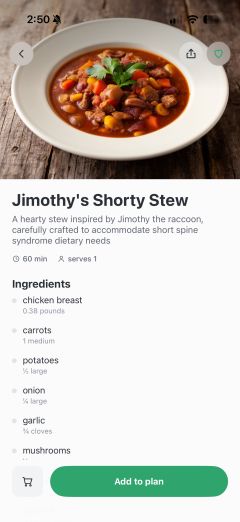
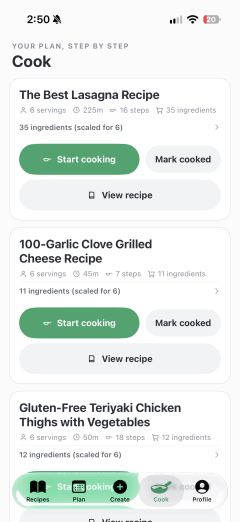
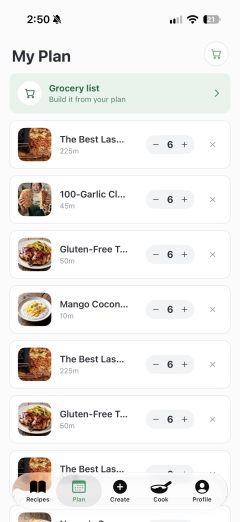
Straight from the simulator or your phone, in the order the store should show them. Add pages with just words, too.
03 / THE LOOK
Browse 33 looks, big, by what they are like: clean, bold, dark, playful and more. Not sure? Pick up to three and see your own first page in each, side by side.


04 / YOUR IMAGES
Headlines are suggested from each screen. See every image before you move on, and ask for changes in plain words.
Yes, use this one →
05 / EVERYWHERE
Tick iPhone, iPad, Android phones and tablets, and up to six languages. The words are translated for you, and the files are sized for each store.
Most people never read the description. They swipe the screenshots and decide there. That row is the whole pitch, so it should argue for the app, frame by frame, and look like it was made on purpose.
Your actual captures go into the render, so what ships is your app, not a stock phone with invented UI in it.
Browse them big and filter by what they are like, or try up to three on your own first page before you choose. Every page then matches it, and your app's own color marks the words that matter. New looks are coming all the time.
Each screenshot is read and gets its own headline ideas. Use one, change it, or write your own.
The same set, composed for each device and written out at exact store dimensions. Six languages, each caption translated to fit.
Ask for an edit in plain words. Every version is kept, nothing is overwritten, and you choose which one ships.
Connect Claude, Cursor or any MCP client and it makes the set for you: uploads the screens, makes and fixes the images, and downloads the files where your build expects them.
Headlines and captions are written only from what your app does and what you told us: no invented ratings, awards or promises that get a listing rejected.
For AI agents · MCP
Connect Claude Code, Codex, Claude, Cursor or any MCP client and ask for store screenshots in plain words. Your agent does the whole job: starts the project, captures screens from the simulator, makes the set, looks at every image and fixes what is off, adds iPad, Android and other languages, and puts the files in fastlane/.
You connect once with your soggyhotdog account. There is no API key to copy or leak.
Reading, writing headlines and checking images are free. Anything that uses credits waits for your go-ahead, and more sizes and languages show the price first.
In Claude Code or Codex it captures the screens from the simulator itself, and the finished files land in fastlane/, ready to upload.
› Make App Store screenshots from the simulator in the Photo-led look, add German and the iPad sizes, and put them in fastlane/.
Done. Ten iPhone and ten iPad images, in English and German, are in fastlane/screenshots/, ready for deliver.
Works with Claude Code · Codex · Claude · Cursor · VS Code · any MCP client
★★★★★
“I'm very pleased with the images Soggy produced for my iOS app! I only needed to upload a few screenshots and process them to produce three images for use in marketing my app in the app store.”


No subscription. See your own app in three looks for free, then pay once for the app: every look, device and language, no watermark, and your AI agent.
See your own app in three looks.
$0
Paid once. Nothing to cancel.
$8 / app
A second app, or more images for this one, is another $8. Images you buy never expire. The screenshots you made stay yours.
No. Plain screenshots are enough, plus a few sentences about what your app does.
Exact store dimensions, ready to upload: iPhone 6.3″ at 1206 × 2622, iPad 13″ at 2064 × 2752, Android at 1080 × 1920, and Android tablets at 1440 × 2560 for Google Play's 7-inch and 10-inch slots.
Six so far: English, German, French, Spanish, Japanese and Brazilian Portuguese. Captions are translated to fit the frame, not stretched, and you can correct any of them afterwards.
Ask for the change in plain words, like "move the caption up" or "warmer background", and that one frame re-renders. Every version is kept, so you can always go back. Each change uses one credit.
You do, free or paid. We don't use your uploads to train anything.

Merch
A real hot dog in a real bun, poured into clear resin by hand. Made to order, and it ships to the United States and Canada.
Try three looks on your own app, free. No card.
